
In game localization QA (LQA), text truncation, overlap, and overflow are common UI display issues that occur when localized text does not fit properly within its designated interface space.
A translated string may be linguistically correct, but if it is cut off, extends beyond its container, or overlaps with other UI elements, players may struggle to read important information.
These issues are particularly common in multilingual games because translated text can vary significantly in length across languages. Proper UI adaptation and in-game testing are therefore essential to maintaining readability and a consistent player experience.
What Is Truncation/Overlap/Overflow in Game Localization QA?
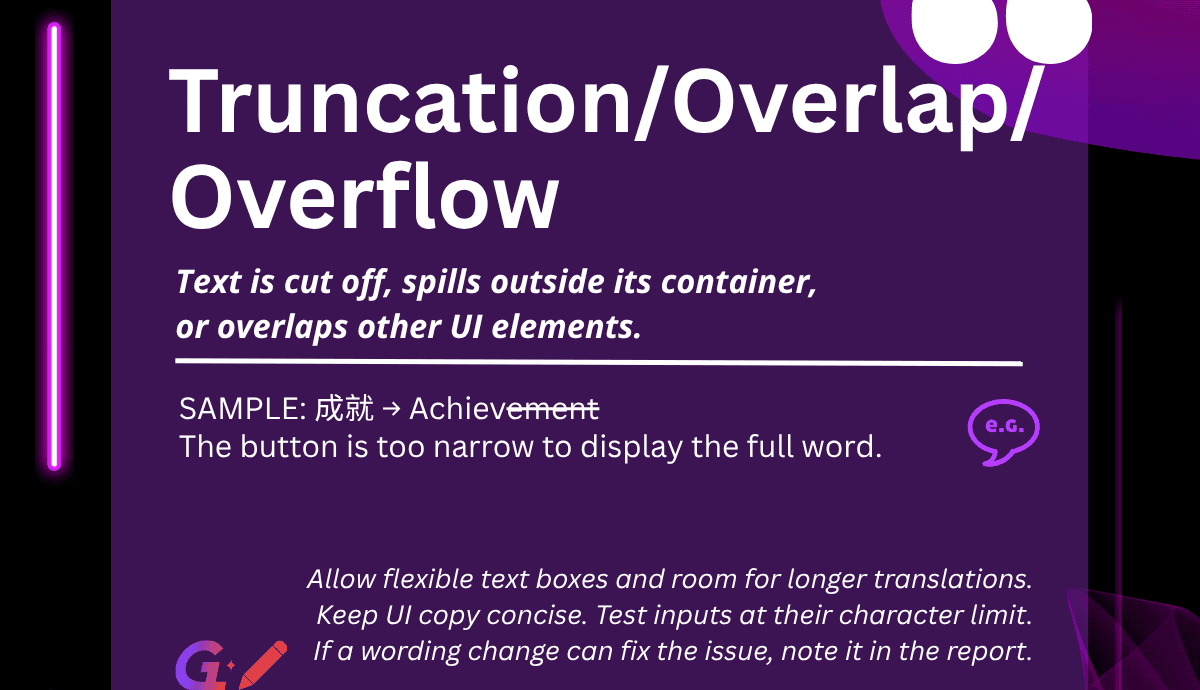
Truncation/Overlap/Overflow refers to situations where localized text is cut off, overflows its designated container, or overlaps with other UI elements.
These issues commonly occur when the available UI space is insufficient for the translated text.
The three problems can appear in different ways:
-
Truncation: Part of the localized text is cut off because the available display space is insufficient.
-
Overflow: Text extends beyond its designated container or display boundaries.
-
Overlap: Text covers or interferes with other UI elements, making the interface difficult to read or use.
Although the translation itself may be correct, these display problems can significantly affect the usability of the localized game.
Example of a Truncation/Overlap/Overflow Bug
Consider a button in a game interface.
Source: 成就
Target: Achievement
The localized word “Achievement” is longer than the available button space, so the button does not have enough room to display the entire word. As a result, the final letters “ment” are cut off, and players can only see “Achieve”.
This is a typical example of a text truncation issue caused by insufficient UI space for the localized string.
Why It Matters
Text truncation, overlap, and overflow can negatively affect the player experience in several ways:
-
Reduced readability: Players may be unable to read complete text or understand important information.
-
Missing information: Important statistics, instructions, or gameplay details may become inaccessible.
-
Poor usability: Overlapping text and UI elements can make buttons and interface components difficult to use.
-
Reduced visual quality: Display issues make the localized version feel unfinished and less polished.
For developers and publishers, these issues are particularly important because even an accurate translation cannot deliver a good player experience if it is not displayed correctly.
LangLink Tip:
Implement auto-scaling text boxes and reserve extra UI space during development for naturally longer languages (e.g., German). Also keep the translation of UI strings concise.
Here are some practical recommendations for game development and LQA teams:
-
Plan for text expansion: Reserve sufficient UI space during development to accommodate longer translations across different languages.
-
Implement auto-scaling: Use flexible text boxes and appropriate resizing rules to prevent text from being cut off or overflowing.
-
Keep UI translations concise: Work with linguists to ensure that localized strings communicate the intended meaning while fitting the available space.
-
Test maximum character limits: For input fields such as usernames, test with maximum-length characters (e.g., “WWW…”) to see how the interface behaves when the character limit is reached.
-
Report text-based fixes: If a display issue can be resolved by adjusting the translation, mention this possibility in the LQA bug report.
Testing localized text in the actual game build is essential, as some display problems cannot be identified through text-file review alone.
Check out more dictionary entries here: Game LQA Bug Dictionary
Follow LangLink Games for more practical insights in our Game LQA Bug Dictionary Series.
